The Samsung Galaxy S26 manual is a free, official PDF guide that helps beginners and seniors set up, use, and troubleshoot their phone. It covers setup, buttons, camera modes, One UI settings, security, and safety information.
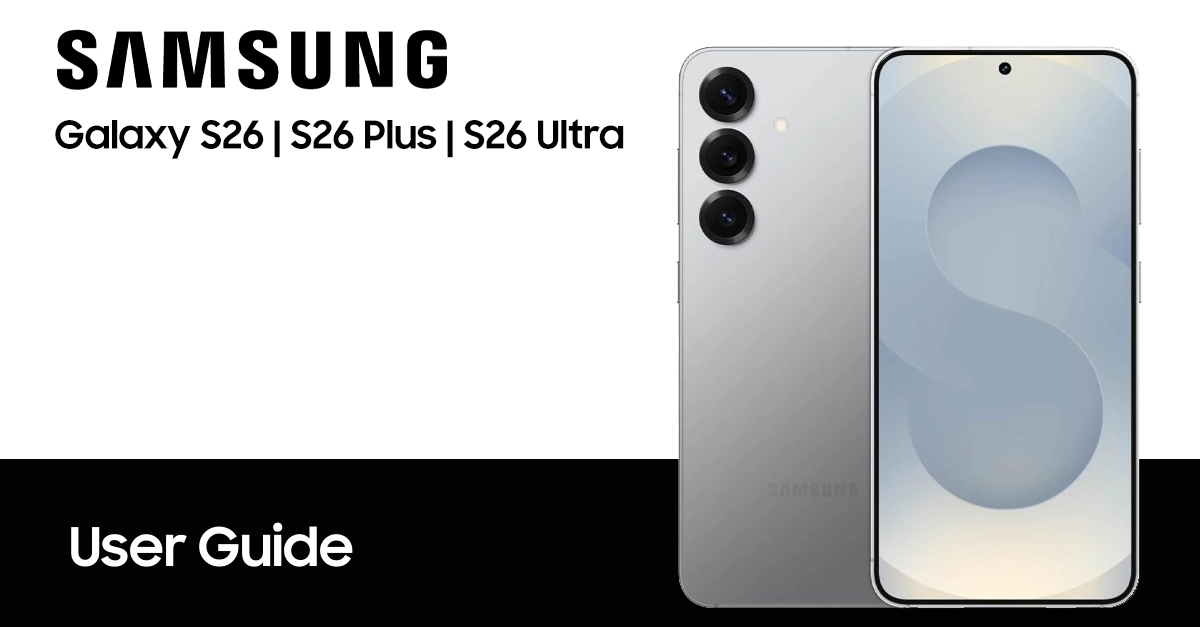
The manual is searchable, works offline, and is available in multiple languages for Galaxy S26, S26 Plus, and S26 Ultra models.
Why Download the Official Samsung Galaxy S26 Manual?
The Samsung Galaxy S26 manual is the fastest way to learn your phone’s features, settings, and troubleshooting steps. You can find and download the official Samsung S26 user manual in PDF format on the table below, then use it to set up your device, customize key functions, and solve common issues.
This guide is designed for beginners and seniors who want clear, practical instructions without technical jargon. It explains where to locate the manual, how to download it safely, and how to use it to get the most from your Galaxy S26.
How to find and download the Samsung S26 manual PDF
Finding the Samsung Galaxy S26 manual is simple and free. Samsung offers official user manuals in PDF format on its support website. To download the Samsung S26 user manual, you can find on the table listed below.
Note: This user manual is taken from Samsung’s official website; we have simply compiled to make it easier to download in your preferred language.
| Country | Version | Model Numbers | Language | Download |
|---|---|---|---|---|
| Global - Unlocked | Galaxy S26 | SM-S942B/DS | English | Download |
| Galaxy S26 Plus | SM-S947B/DS | Download | ||
| Galaxy S26 Ultra | SM-S948B/DS | Download | ||
| Albania | Galaxy S26 | SM-S942B/DS | Albanian | Download |
| Galaxy S26 Plus | SM-S947B/DS | Download | ||
| Galaxy S26 Ultra | SM-S948B/DS | Download | ||
| Australia | Galaxy S26 | SM-S942B/DS | English | Download |
| Galaxy S26 Plus | SM-S947B/DS | Download | ||
| Galaxy S26 Ultra | SM-S948B/DS | Download | ||
| Brazil | Galaxy S26 | SM-S942B/DS | Português | Download |
| Galaxy S26 Plus | SM-S947B/DS | Download | ||
| Galaxy S26 Ultra | SM-S948B/DS | Download | ||
| Bulgaria | Galaxy S26 | SM-S942B/DS | Български | Download |
| Galaxy S26 Plus | SM-S947B/DS | Download | ||
| Galaxy S26 Ultra | SM-S948B/DS | Download | ||
| Canada | Galaxy S26 | SM-S942W | English | Download |
| Galaxy S26 Plus | SM-S947W | Download | ||
| Galaxy S26 Ultra | SM-S948W | Download | ||
| Canada | Galaxy S26 | SM-S942W | Français | Download |
| Galaxy S26 Plus | SM-S947W | Download | ||
| Galaxy S26 Ultra | SM-S948W | Download | ||
| China | Galaxy S26 | SM-S9420 | 中文 | Download |
| Galaxy S26 Plus | SM-S9470 | Download | ||
| Galaxy S26 Ultra | SM-S9480 | Download | ||
| Croatia | Galaxy S26 | SM-S942B/DS | Hrvatski | Download |
| Galaxy S26 Plus | SM-S947B/DS | Download | ||
| Galaxy S26 Ultra | SM-S948B/DS | Download | ||
| Česká republika | Galaxy S26 | SM-S942B/DS | Čeština | Download |
| Galaxy S26 Plus | SM-S947B/DS | Download | ||
| Galaxy S26 Ultra | SM-S948B/DS | Download | ||
| Danmark | Galaxy S26 | SM-S942B/DS | Dansk | Download |
| Galaxy S26 Plus | SM-S947B/DS | Download | ||
| Galaxy S26 Ultra | SM-S948B/DS | Download | ||
| Estonian | Galaxy S26 | SM-S942B/DS | Eesti | Download |
| Galaxy S26 Plus | SM-S947B/DS | Download | ||
| Galaxy S26 Ultra | SM-S948B/DS | Download | ||
| Europe | Galaxy S26 | SM-S942B/DS | English | Download |
| Galaxy S26 Plus | SM-S947B/DS | Download | ||
| Galaxy S26 Ultra | SM-S948B/DS | Download | ||
| Finland | Galaxy S26 | SM-S942B/DS | Finnish | Download |
| Galaxy S26 Plus | SM-S947B/DS | Download | ||
| Galaxy S26 Ultra | SM-S948B/DS | Download | ||
| France | Galaxy S26 | SM-S942B/DS | Français | Download |
| Galaxy S26 Plus | SM-S947B/DS | Download | ||
| Galaxy S26 Ultra | SM-S948B/DS | Download | ||
| German | Galaxy S26 | SM-S942B/DS | Germany | Download |
| Galaxy S26 Plus | SM-S947B/DS | Download | ||
| Galaxy S26 Ultra | SM-S948B/DS | Download | ||
| Greece | Galaxy S26 | SM-S942B/DS | Greek | Download |
| Galaxy S26 Plus | SM-S947B/DS | Download | ||
| Galaxy S26 Ultra | SM-S948B/DS | Download | ||
| Hongkong | Galaxy S26 | SM-S9420 | Traditional Chinese | Download |
| Galaxy S26 Plus | SM-S9470 | Download | ||
| Galaxy S26 Ultra | SM-S9480 | Download | ||
| Hungary | Galaxy S26 | SM-S942B/DS | Magyar/Hungarian | Download |
| Galaxy S26 Plus | SM-S947B/DS | Download | ||
| Galaxy S26 Ultra | SM-S948B/DS | Download | ||
| India | Galaxy S26 | SM-S942B/DS | Bengali | Download |
| Galaxy S26 Plus | SM-S947B/DS | Download | ||
| Galaxy S26 Ultra | SM-S948B/DS | Download | ||
| Indonesia | Galaxy S26 | SM-S942B/DS | Bahasa Indonesia | Download |
| Galaxy S26 Plus | SM-S947B/DS | Download | ||
| Galaxy S26 Ultra | SM-S948B/DS | Download | ||
| Israel | Galaxy S26 | SM-S942B/DS | Hebrew | TBA |
| Galaxy S26 Plus | SM-S947B/DS | TBA | ||
| Galaxy S26 Ultra | SM-S948B/DS | TBA | ||
| Italia | Galaxy S26 | SM-S942B/DS | Italiano | Download |
| Galaxy S26 Plus | SM-S947B/DS | Download | ||
| Galaxy S26 Ultra | SM-S948B/DS | Download | ||
| Korea | Galaxy S26 | SM-S942N | 한국어 | Download |
| Galaxy S26 Plus | SM-S947N | Download | ||
| Galaxy S26 Ultra | SM-S948N | Download | ||
| Laos | Galaxy S26 | SM-S942B/DS | ພາສາລາວ | Download |
| Galaxy S26 Plus | SM-S947B/DS | Download | ||
| Galaxy S26 Ultra | SM-S948B/DS | Download | ||
| Latin America | Galaxy S26 | SM-S942B/DS | Spanish/Español | Download |
| Galaxy S26 Plus | SM-S947B/DS | Download | ||
| Galaxy S26 Ultra | SM-S948B/DS | Download | ||
| Latvia | Galaxy S26 | SM-S942B/DS | Latviešu | Download |
| Galaxy S26 Plus | SM-S947B/DS | Download | ||
| Galaxy S26 Ultra | SM-S948B/DS | Download | ||
| Lithuania | Galaxy S26 | SM-S942B/DS | Lietuvių | Download |
| Galaxy S26 Plus | SM-S947B/DS | Download | ||
| Galaxy S26 Ultra | SM-S948B/DS | Download | ||
| Macedonia | Galaxy S26 | SM-S942B/DS | Mакедонски | Download |
| Galaxy S26 Plus | SM-S947B/DS | Download | ||
| Galaxy S26 Ultra | SM-S948B/DS | Download | ||
| Middle East | Galaxy S26 | SM-S942B/DS | Arabic | Download |
| Galaxy S26 Plus | SM-S947B/DS | Download | ||
| Galaxy S26 Ultra | SM-S948B/DS | Download | ||
| Middle East | Galaxy S26 | SM-S942B/DS | Farsi | TBA |
| Galaxy S26 Plus | SM-S947B/DS | TBA | ||
| Galaxy S26 Ultra | SM-S948B/DS | TBA | ||
| Nederlands | Galaxy S26 | SM-S942B/DS | Nederlands | Download |
| Galaxy S26 Plus | SM-S947B/DS | Download | ||
| Galaxy S26 Ultra | SM-S948B/DS | Download | ||
| Myanmar | Galaxy S26 | SM-S942B/DS | Burmese | Download |
| Galaxy S26 Plus | SM-S947B/DS | Download | ||
| Galaxy S26 Ultra | SM-S948B/DS | Download | ||
| New Zealand | Galaxy S26 | SM-S942B/DS | English | Download |
| Galaxy S26 Plus | SM-S947B/DS | Download | ||
| Galaxy S26 Ultra | SM-S948B/DS | Download | ||
| Norwegia | Galaxy S26 | SM-S942B/DS | Norsk | Download |
| Galaxy S26 Plus | SM-S947B/DS | Download | ||
| Galaxy S26 Ultra | SM-S948B/DS | Download | ||
| Pakistan | Galaxy S26 | SM-S942B/DS | Urdu | TBA |
| Galaxy S26 Plus | SM-S947B/DS | TBA | ||
| Galaxy S26 Ultra | SM-S948B/DS | TBA | ||
| Poland | Galaxy S26 | SM-S942B/DS | Język polski | Download |
| Galaxy S26 Plus | SM-S947B/DS | Download | ||
| Galaxy S26 Ultra | SM-S948B/DS | Download | ||
| Portugal | Galaxy S26 | SM-S942B/DS | Português | Download |
| Galaxy S26 Plus | SM-S947B/DS | Download | ||
| Galaxy S26 Ultra | SM-S948B/DS | Download | ||
| Romania | Galaxy S26 | SM-S942B/DS | Română | Download |
| Galaxy S26 Plus | SM-S947B/DS | Download | ||
| Galaxy S26 Ultra | SM-S948B/DS | Download | ||
| Russia | Galaxy S26 | SM-S942B/DS | Русский | Download |
| Galaxy S26 Plus | SM-S947B/DS | Download | ||
| Galaxy S26 Ultra | SM-S948B/DS | Download | ||
| Serbia | Galaxy S26 | SM-S942B/DS | Serbian | Download |
| Galaxy S26 Plus | SM-S947B/DS | Download | ||
| Galaxy S26 Ultra | SM-S948B/DS | Download | ||
| Singapore | Galaxy S26 | SM-S942B/DS | English | Download |
| Galaxy S26 Plus | SM-S947B/DS | Download | ||
| Galaxy S26 Ultra | SM-S948B/DS | Download | ||
| Singapore | Galaxy S26 | SM-S942B/DS | Simplified Chinese | Download |
| Galaxy S26 Plus | SM-S947B/DS | Download | ||
| Galaxy S26 Ultra | SM-S948B/DS | Download | ||
| Slovakia | Galaxy S26 | SM-S942B/DS | Slovak | Download |
| Galaxy S26 Plus | SM-S947B/DS | Download | ||
| Galaxy S26 Ultra | SM-S948B/DS | Download | ||
| Slovenija | Galaxy S26 | SM-S942B/DS | Slovene | Download |
| Galaxy S26 Plus | SM-S947B/DS | Download | ||
| Galaxy S26 Ultra | SM-S948B/DS | Download | ||
| South East Asia | Galaxy S26 | SM-S942B/DS | English | Download |
| Galaxy S26 Plus | SM-S947B/DS | Download | ||
| Galaxy S26 Ultra | SM-S948B/DS | Download | ||
| South East Asia | Galaxy S26 | SM-S942B/DS | Simplified Chinese | Download |
| Galaxy S26 Plus | SM-S947B/DS | Download | ||
| Galaxy S26 Ultra | SM-S948B/DS | Download | ||
| Spain | Galaxy S26 | SM-S942B/DS | Español | Download |
| Galaxy S26 Plus | SM-S947B/DS | Download | ||
| Galaxy S26 Ultra | SM-S948B/DS | Download | ||
| Sweden | Galaxy S26 | SM-S942B/DS | Svenska | Download |
| Galaxy S26 Plus | SM-S947B/DS | Download | ||
| Galaxy S26 Ultra | SM-S948B/DS | Download | ||
| Taiwan | Galaxy S26 | SM-S942B/DS | Traditional Chinese | Download |
| Galaxy S26 Plus | SM-S947B/DS | Download | ||
| Galaxy S26 Ultra | SM-S948B/DS | Download | ||
| Thailand | Galaxy S26 | SM-S942B/DS | Thai | Download |
| Galaxy S26 Plus | SM-S947B/DS | Download | ||
| Galaxy S26 Ultra | SM-S948B/DS | Download | ||
| Turkey | Galaxy S26 | SM-S942B/DS | Turkish | Download |
| Galaxy S26 Plus | SM-S947B/DS | Download | ||
| Galaxy S26 Ultra | SM-S948B/DS | Download | ||
| Ukraina | Galaxy S26 | SM-S942B/DS | Ukrainian | Download |
| Galaxy S26 Plus | SM-S947B/DS | Download | ||
| Galaxy S26 Ultra | SM-S948B/DS | Download | ||
| United Kingdom | Galaxy S26 | SM-S942B/DS | English | Download |
| Galaxy S26 Plus | SM-S947B/DS | Download | ||
| Galaxy S26 Ultra | SM-S948B/DS | Download | ||
| US – AT&T | Galaxy S26 | SM-S942U | English | Download |
| Galaxy S26 Plus | SM-S947U | Download | ||
| Galaxy S26 Ultra | SM-S948U | Download | ||
| US – Metro PCS | Galaxy S26 | SM-S942U | English | Download |
| Galaxy S26 Plus | SM-S947U | Download | ||
| Galaxy S26 Ultra | SM-S948U | Download | ||
| US – Cricket | Galaxy S26 | SM-S942U | English | Download |
| Galaxy S26 Plus | SM-S947U | Download | ||
| Galaxy S26 Ultra | SM-S948U | Download | ||
| US – Cricket | Galaxy S26 | SM-S942U | Spanish/Español | Download |
| Galaxy S26 Plus | SM-S947U | Download | ||
| Galaxy S26 Ultra | SM-S948U | Download | ||
| US – US Cellular | Galaxy S26 | SM-S942U | English | Download |
| Galaxy S26 Plus | SM-S947U | Download | ||
| Galaxy S26 Ultra | SM-S948U | Download | ||
| US – Verizon | Galaxy S26 | SM-S942U | English | Download |
| Galaxy S26 Plus | SM-S947U | Download | ||
| Galaxy S26 Ultra | SM-S948U | Download | ||
| Vietnam | Galaxy S26 | SM-S942B/DS | Tiếng Việt Nam | Download |
| Galaxy S26 Plus | SM-S947B/DS | Download | ||
| Galaxy S26 Ultra | SM-S948B/DS | Download | ||
NOTE: For reading this manual, your computer required Adobe Reader apps. You can get the Adobe Reader for free by going here https://get.adobe.com/reader/.
How to access the Samsung S26 manual from your device
Samsung makes it extremely simple to access your phone’s manual directly from the device itself. You can view it right on your S26 device.
Here’s how:
- On your Samsung S26, open Settings.
- Scroll down and look for User Manual, Help, or Tips and User Guide.
- Tap to open, and follow the on-screen instructions to access it.
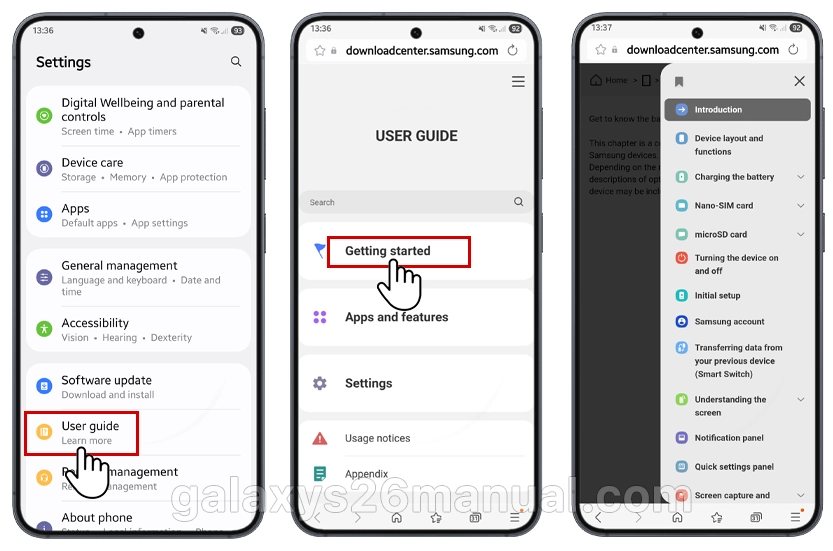
The manual covers essential topics such as setup, navigation, camera use, and security features, all written in beginner-friendly language.
What you’ll find in the Samsung S26 user guide
Once downloaded, the Samsung S26 user guide PDF provides detailed step-by-step instructions and visuals. Here’s a sneak peek at what’s inside:
- Device Setup: How to insert your SIM card, charge the phone, and power it on and also power off your device.
- Samsung Account: Learn how to register your device and unlock the full Samsung ecosystem.
- Fast Charging Tips: Keep your device ready to go using Samsung Adaptive Fast Charging.
- Voicemail Set Up Guide: Voicemail lets callers leave a message when you can’t answer. You can find the guide to setting up your voicemail and also Direct Voicemail.
- Security Settings: Discover how to use face unlock, fingerprint sensor, and Samsung Pass.
- Navigation & Gestures: Tips on using One UI efficiently with multitasking tricks.
- Troubleshooting Basics: Solutions for common issues like Wi-Fi or battery concerns.
It’s designed to help beginners understand every function easily without needing expert technical knowledge.
What to Do If the PDF Won’t Download or Open
- Download fails: Clear your browser cache, switch from mobile data to Wi-Fi, or try a different regional Samsung site.
- File won’t open: Ensure you have a PDF reader installed. Samsung phones can use Samsung Notes or Files to read PDFs.
- Wrong language: On the support page, check the language dropdown before downloading. Samsung hosts manuals in dozens of languages.
Why you should download the PDF version
 Having the Samsung S26 user manual in PDF format is convenient because you can open it anytime, even without the internet. Whether you’re traveling or just customizing your phone, the offline manual will make life easier. It’s also searchable, so you can find topics fast.
Just save it on your device, in cloud storage, or on your computer for quick reference.
Benefits of Reading the Samsung S26 Manual
Reading the Samsung Galaxy S26 manual PDF offers several key benefits that can significantly enhance your experience with the device. Here are the main advantages:
- Master All Features & Settings: The manual serves as your personal instructor, guiding you through everything from initial setup to advanced features. With powerful new Galaxy AI tools like Now Brief, Call Screening, and Creative Studio, the manual helps you unlock the full potential of your device.
- Offline Accessibility: Once downloaded, the PDF is available anytime without an internet connection. This is especially useful when you’re traveling or in areas with poor connectivity.
- Searchable Text: Unlike a printed booklet, the PDF lets you quickly find answers by searching for specific keywords or topics. No more flipping through pages to find what you need.
- Comprehensive Troubleshooting: The manual includes step-by-step instructions for resolving common issues. Instead of searching online or guessing, you can consult the official guide for accurate solutions.
- Always Up-to-Date: Digital manuals can be updated by Samsung to include new tips or reflect software changes, ensuring you always have the most current information.
- Environmentally Friendly: Choosing the PDF saves paper and reduces waste compared to a printed manual.
- Easy Access & Portability: You can store the PDF on your phone, tablet, or computer for quick reference whenever questions arise. Samsung provides the official manual free of charge through their support website.
In short, downloading the Samsung Galaxy S26 manual PDF is a simple step that empowers you to get the most out of your device, troubleshoot effectively, and stay informed about its capabilities.
Tips for beginners using the Samsung Galaxy S26
Once you’ve got your manual, here are a few beginner tips to make the most out of your phone:
- Enable Adaptive Battery to extend performance throughout the day.
- Use Smart Switch to transfer data from old devices easily.
- Customize Edge Panels for instant access to your favorite apps.
- Explore Modes & Routines to automate tasks and save time.
Every one of these features is explained step-by-step in the Samsung S26 user guide PDF.
Conclusion
The Samsung Galaxy S26 manual and user guide PDF isn’t just a manual—it’s your roadmap to mastering your device. From setup to security, it walks you through everything in a clear, friendly way perfect for beginners. Download it today, keep it handy, and explore what your Samsung Galaxy S26 can really do.
Downloading the Samsung Galaxy S26 manual PDF takes less than two minutes and gives you a permanent, offline reference for every feature. Stick to Samsung’s official support portal or the Samsung Members app to ensure you get the accurate, up-to-date document for your exact model.
If you found this guide helpful, check our beginner’s tutorial on Galaxy S26 initial setup and data transfer] to get your new phone configured perfectly in under 15 minutes.

gratias tibi agimus quod ducem lingua nostra praebuisti. salutem optimam ex mexico.